
Si-Chef on Telegram
Si-Chef on Telegram is the same AI chef from your CRM, in a private Telegram chat. It reads the same live data, follows the same permissions, and turns every change into a proposal you approve. The difference is the door: you can ask from your phone, between services, without opening the CRM.
The chat is linked to your own 86 account. It only works in private messages with you — never in groups — and it only acts on the Organization, and the default restaurant if you set one, that the link is bound to.
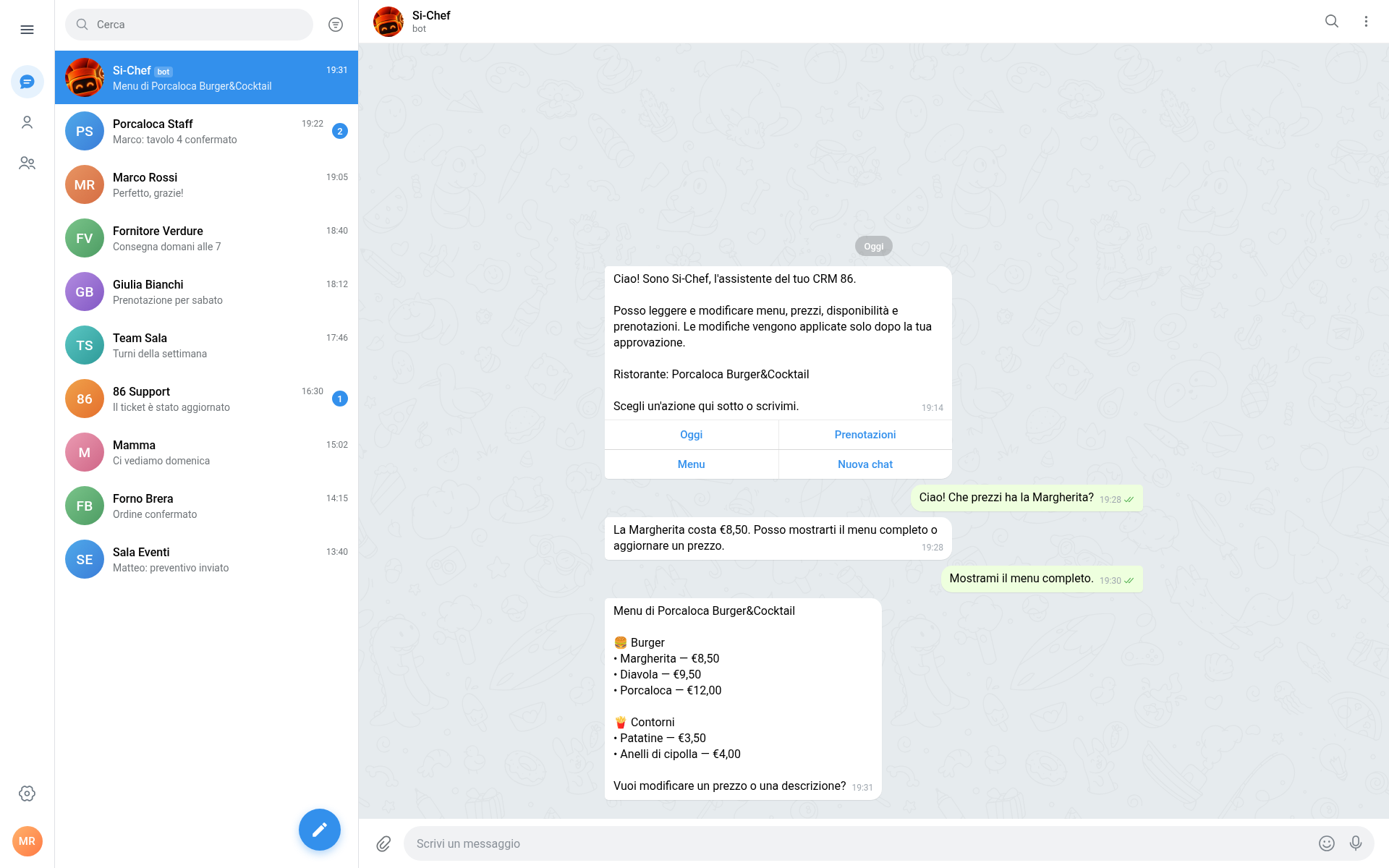
Connect your account
Section titled “Connect your account”There are two ways to link a Telegram account. Both end in the same place: a confirmed link between your chat and your 86 account.
- Open the Si-Chef bot in Telegram. You will find its handle on the Si-Chef on Telegram card in Settings ▸ General, or in the invite your team shared.
- Send
/start. The bot replies with an Accedi e collega (Sign in and connect) button. - Tap the button. Telegram opens the CRM connect page in your browser.
- Sign in with your 86 account — including two-factor authentication if you use it — and choose the Organization the chat should work for. If you belong to only one Organization it is already selected.
- Optionally choose a default restaurant, then tap Connect this account.
- Return to Telegram. Si-Chef posts a confirmation in the chat; send
/helpto see the quick actions.
- Open Settings ▸ General and find the Si-Chef on Telegram card.
- Click Connect Telegram. A single-use link opens Telegram.
- In Telegram, tap Start to open the bot. The chat is linked to your 86 account, with the restaurant you had selected in the CRM as its default.
- Return to the CRM. The card shows Connected, your Telegram username, and the default restaurant.
The CRM link is single-use and expires after 15 minutes. If it expires, click Connect Telegram again for a fresh one.
Connected, disconnected, and linked again
Section titled “Connected, disconnected, and linked again”- One active link per Telegram account. Connecting the same account again replaces the previous link.
- Disconnect from either side. Send
/unlinkin the chat, or use Disconnect on the CRM card. Si-Chef stops answering on the next message; the chat history stays in the CRM. - Re-linking moves the chat, not the history. If you link the same Telegram account to a different 86 user or Organization, the old thread is detached and a new one starts. The old conversation keeps its history with its original Organization, and the bot never mixes the two.
- Permission changes apply immediately. Si-Chef checks the link and your permissions on every message, so a role change or a disconnect takes effect straight away.
What you can do
Section titled “What you can do”Si-Chef on Telegram covers the same ground as Si-Chef in the CRM. The full list, with example questions, is in What Si-Chef can do. In short:
- Checks — “How many covers do we have on Friday?”, “What’s the price of the Margherita?”, “Show me tonight’s bookings.”
- Changes — “Move the Rossi booking on Saturday from 8pm to 9pm.”, “Update the Margherita to €9.”, “Mark the burrata as sold out.”, “Point the menu link at the winter menu.”
- How-to answers — “How do I add a time slot?” comes back with the answer and a link to the page in this manual.
The same rules apply as in the CRM: Si-Chef only works with the linked Organization, and with the default restaurant when one is set, and it respects your account’s permissions. If you cannot edit the menu in the CRM, you cannot edit it from Telegram either.
Quick actions and commands
Section titled “Quick actions and commands”The welcome and help messages carry four buttons — Oggi, Prenotazioni, Menu, and Nuova chat — that ask the questions operators need most during service. They run through the same assistant as a typed message, so they use the same data and the same approvals.
The bot also understands these commands:
| Command | What it does |
|---|---|
/start |
Link the chat, or show the quick actions and connection status if it is already linked. |
/help |
Show what Si-Chef can do, the command list, and whether voice notes are active. |
/oggi (also oggi or today) |
Today’s briefing: bookings and covers, next arrivals, 86 dishes, and low stock where available. |
/86 <dish> (also /soldout) |
Propose marking a dish as sold out. Approve the proposal to apply it. |
/new (also /nuova) |
Start a new conversation. The current one is closed in the CRM but keeps its history. |
/notifiche on / /notifiche off (also /notifications) |
Turn Telegram alerts on or off. The chat stays connected either way. |
/status |
Show the linked 86 account and default restaurant. |
/unlink |
Disconnect this chat from your 86 account. |
Ask in Italian or English; Si-Chef answers in the language you write.
Photos and voice notes
Section titled “Photos and voice notes”- Photos — send a dish photo with or without a caption, up to 10 MB. When the chat has a default restaurant, Si-Chef stores it there and can propose attaching it to the dish.
- Voice notes — when they are enabled for your account, send a voice note and Si-Chef transcribes it.
/helptells you whether they are active; if not, it asks you to type the message.
Alerts in Telegram
Section titled “Alerts in Telegram”Once the chat is linked, Si-Chef can deliver the operational alerts you already receive in the CRM, so they reach you even when the CRM is closed:
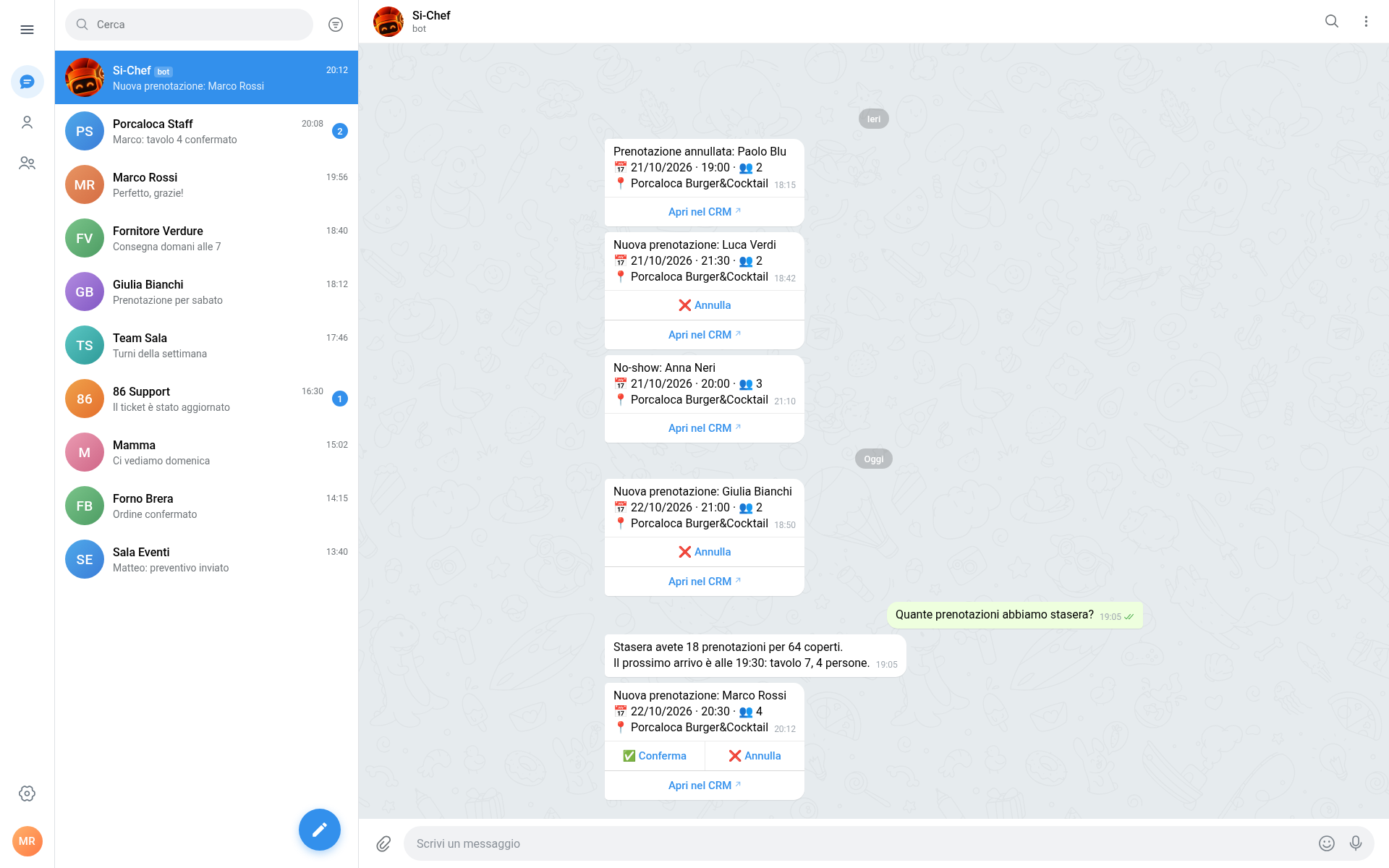
- Bookings — new, changed, and cancelled bookings, no-shows, arriving-soon reminders, and waitlist joins.
- Orders — new pickup orders, orders sent to the kitchen, and prepaid pickups whose authorization is about to expire.
- Stock — low stock and auto-86.
- Payments — failed table payments and failed deposit charges.
- Team — time-off requests.
- Account and support — subscription at risk and updates on a support request Si-Chef filed for you.
Alerts follow the same audience rules as the CRM: the notification type must be available on your plan, your role must have the matching permission, and the type must not be muted in Notifications ▸ Preferences. Muting a type in the CRM also mutes it here. Telegram alerts are independent from browser push — you can receive them without enabling push on any device.
Booking alerts include the date, time, party size, and restaurant, with ✅ Conferma, ❌ Annulla, and Apri nel CRM buttons. Confirm and cancel act immediately after re-checking the link and your permissions; they are not proposals, and repeated taps are safe.
Use /notifiche off to stop alerts without disconnecting the bot, and /notifiche on to bring them back.
Limits and privacy
Section titled “Limits and privacy”- Private chats only. Messages in groups or channels get a “write to me in private” reply and are not processed.
- AI-only. There is no handoff to a person on Telegram. If you need the Eighty-Six team, use the support chat in the CRM or email
support@eighty-six.tech— see Getting help. - One Organization at a time. If you manage more than one restaurant, set a default when connecting or name the restaurant in your message.
- Your permissions apply. Si-Chef never gives you access you do not have in the CRM.
- No silent edits. Changes are applied only after you approve them, and only once. A proposal left untouched expires after 30 minutes; ask again for a fresh one.
- History stays with the Organization. Conversations are stored with your Organization’s support history.
/newstarts a fresh thread but does not delete the previous one; use Telegram’s Clear history to remove the visible messages from your side. - Media limit is 10 MB for photos, documents, and voice notes.
Tips for service
Section titled “Tips for service”- Start the day with
/oggifor a one-message briefing on covers, arrivals, 86 dishes, and low stock. - Use
/86 <dish>the moment something runs out. Approve the proposal and the menu updates. - Keep booking alerts on. They are the fastest way to see a new reservation or a guest arriving soon when you are away from the desk.
- Mute what you do not act on in Notifications ▸ Preferences; the chat keeps only the alerts that matter to your role.
- Name the restaurant when you manage several, even with a default set.